Cleaner Interface, Local Bookmark Backup Included

A lot of you told us the interface felt crowded, and it was hard to find what you were looking for.
We felt the same way. The more we used it, the more awkward it got.
So this update does two things: clean up the interface, and give your bookmarks a local safety net.
🏠 Homepage: From a Few Buttons to a Glance at Your Bookmarks
The old homepage was just a few buttons.
Sync, upload, settings — plain doorways, nothing more. Honestly, you don't care about buttons.
What you care about is: did my bookmarks actually sync?
We added a sync-success animation before. It wasn't enough.
This time we went further. The homepage now shows real data.
Don't click anything — the icon status tells you if sync is healthy. Click in, and there's the bookmark count, the sync details, all right in front of you.
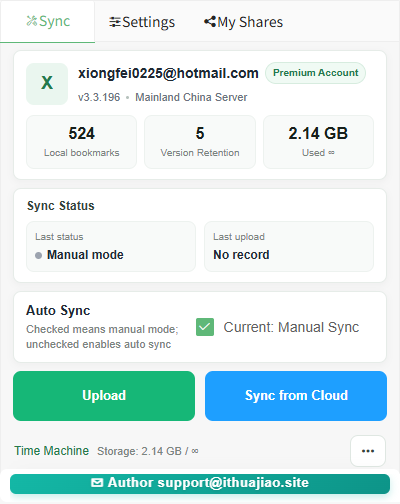
No more digging to find out. Open the homepage, and you just know.
🕘 Cloud History: Fewer Buttons, Smoother Actions
Cloud history is where you go to find older versions of your bookmarks.
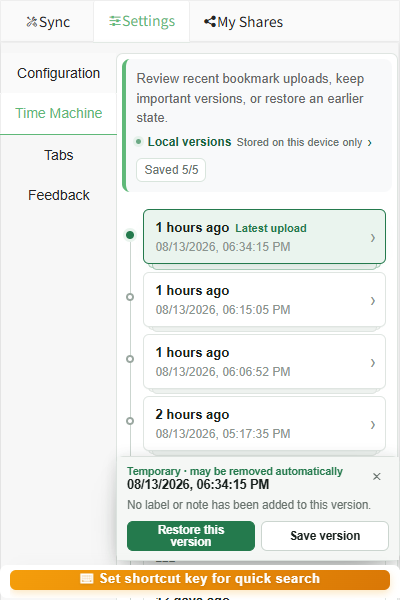
Before, there were too many buttons, and a lot of duplicates. Hunting for a version or hitting restore meant wading through a pile of buttons first.
We rebuilt it.
Buttons are trimmed down. The interface is cleaner. Actions feel natural, and it's obvious where to click.
As a bonus, the content is richer too — version differences are clearer, so finding an old version is no longer a guessing game.
🛡️ Local Bookmark Versions: Even If the Cloud Fails, Your Bookmarks Don't
This is the feature I'm most excited to talk about.
Let's start with the pain point.
Before, you only had cloud history versions. That works most of the time. But if the cloud hits a conflict for some special reason, versions can be lost outright. And bookmarks you've collected for years could vanish with them.
Losing bookmarks really stings.
So this time, we added local bookmark versions.
Whenever your local bookmarks change, a version is created automatically. It's stored on your device, never uploaded to the cloud.
Local versions are the safety net.
Whatever happens to the cloud, you can always go back to any local version where something changed. The odds of losing bookmarks drop to almost nothing.
The benefits are real:
- Recover offline. Made a mistake or deleted something? Restore it without an internet connection.
- Cloud conflicts? No problem. Even if cloud data breaks, local versions are still there.
- Want it on another browser? "Restore and sync" pushes it to other browsers in one click.
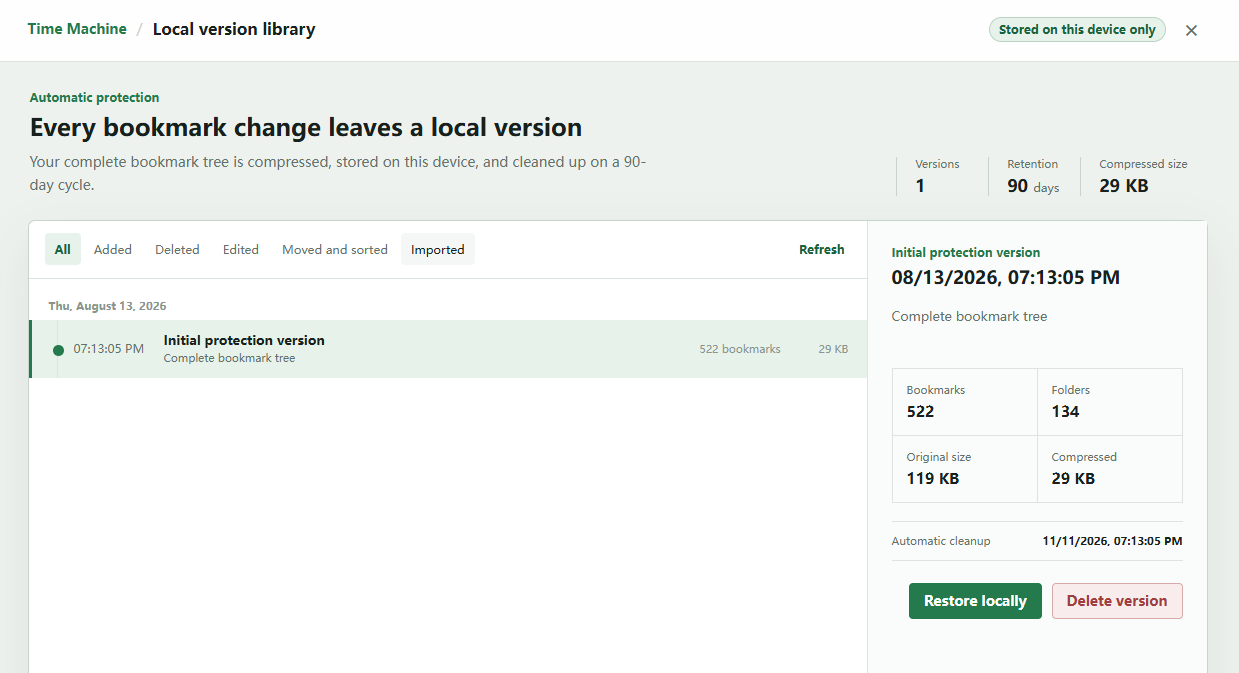
Simply put: the cloud handles cross-device sync, and local handles the safety net. Two layers of insurance, and your bookmarks feel much safer.
💬 A Few Words From Us
This redesign doesn't add any flashy new features.
It's about making the interface clearer, so you think one step less.
Plus the local bookmark version safety net — bookmarks take years to build up. One more backup always feels a little more reassuring.
📥 About the Download
This update covers both the browser extension and the macOS client.
- If the extension is already installed, your browser will update it automatically.
- The macOS client is available on the official website's download page.
Official website: https://bksync.ithuajiao.site
⚠️ Friendly Reminder
Before using any bookmark tool, we strongly recommend exporting a local backup first. If the tool doesn't meet your expectations, you can restore your original data at any time, minimizing the risk of data loss.
📚 Related Reading
- Bookmark Sync Enters the Real-Time Era
- How to Use Bookmark UniSync
- Frequently Asked Questions
- Update History
Any questions or suggestions? Reach out:
- 📧 Email Support: support@ithuajiao.site
- 💬 WeChat Official Account: Search "挨踢花椒" and send a message
When the interface is clear, your mind feels at ease. Bookmarks are the same — one more local backup, one more layer of peace of mind.