Your Bookmarks, Within Reach - Say Goodbye to the Frustration of Losing Bookmarks When Switching Devices

Have you ever experienced this frustration?
You switched to a new computer, only to discover that hundreds of carefully curated bookmarks are nowhere to be found? You saw a great article on your work computer, wanted to read it on your phone at home, but couldn't remember the link? A colleague sent you an amazing website, you bookmarked it, but can't find it on another device?
If you've had these experiences, then this article is written for you.
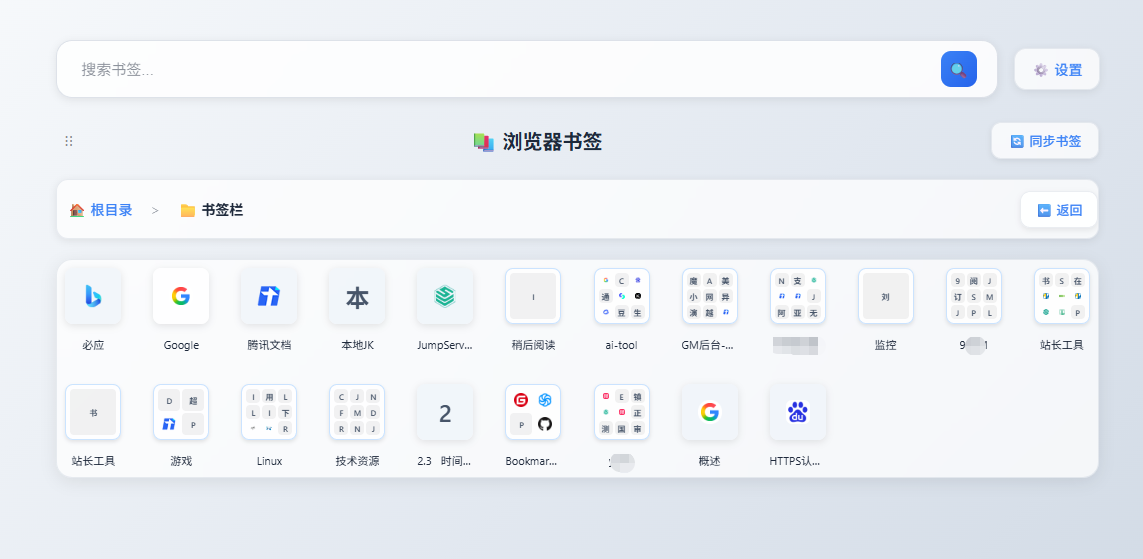
🌟 What is "Bookmark Cloud Access"?
Simply put, it's like a bookmark folder you carry with you.
On any computer, any phone, any tablet, as long as you open your browser and log into your account, you can see all your bookmarked pages.
No need to install any software, no data cables, no USB drives - as long as you have a browser, your bookmarks are right there.
💡 What problems can it solve for you?
Scenario 1: Multiple devices, bookmarks don't follow
Wang's frustration:
"I have 3 computers - one at home, one at work, and a laptop. Every time I switch computers for work, I have to search again for resources I previously bookmarked. It's such a waste of time!"
Our solution: Now, when Wang bookmarks something on any computer, it immediately appears on the other two computers. Whether working overtime at home or traveling with a laptop, all bookmarks follow him.
Scenario 2: Urgent search, low efficiency
Ms. Li's frustration:
"I saw a very useful tool website last week, bookmarked it at the time, but now I need it urgently and can't find it after searching all my devices. I'm breaking out in a sweat!"
Our solution: Open your browser, log into your account, type "tool" and find it in 0.1 seconds. Even if you forgot the website name, as long as you remember it's a "development tool," you can quickly locate it.
Scenario 3: Team collaboration, resource sharing
Manager Zhang's need:
"Our team frequently shares useful resources, but everyone bookmarks them on different devices. Finding a resource requires asking several people, which is too inefficient."
Our solution: Create a team bookmark library that everyone can access. When Manager Zhang bookmarks a resource, team members can immediately see it, improving collaboration efficiency by 300%.
Scenario 4: AI Assistant, Knowledge Empowerment
Xiao Li's confusion:
"I've collected hundreds of technical documents and learning materials, but the links in the bookmark bar can't be directly provided to AI for use. When I want AI to help me summarize, translate, or create content, I have to open webpages one by one to copy the content. It's too troublesome!"
Our solution: Through cloud access functionality, you can one-click export bookmark data and provide it directly to AI:
- Smart Summary: Let AI quickly summarize key points from multiple articles you've collected
- Translation & Polishing: Translate foreign technical documents into Chinese, or let AI refine and optimize them
- Create Skills: Based on collected materials, let AI help you create custom skills or knowledge bases
- Deep Analysis: Let AI analyze the content of webpages you've bookmarked to discover potential knowledge connections
The bookmark bar can only store links, but cloud bookmark data allows your knowledge to truly flow and seamlessly collaborate with AI, unlocking the maximum value of your knowledge!
🎯 No matter who you are, you can easily get started
If you're a computer beginner 🌱
Don't worry, we've prepared the simplest operations for you:
- Open your browser and visit our website
- Enter your username and password, click login
- Done! Your bookmarks are here
It's that simple! No need to understand technology, no need to download software, no need to learn complex operations.
As simple as opening your email to check messages.
If you're a professional user 👨💻
You'll discover more powerful features:
- Tree Folder Management: Organize bookmarks like computer folders, 9-grid preview,一目了然 (clear at a glance)
- Website Brand Color Recognition: GitHub black, Google blue, Vue green, recognize at a glance
- Light/Dark Theme: Fresh and comfortable for day work, eye protection for night reading
- Perfect Mobile Adaptation: Phone, tablet, computer, interface automatically adapts
This isn't just a simple bookmark list, it's your knowledge management center.
🔒 How do we protect your privacy?
We understand your security concerns:
- Data Encryption Storage: Your bookmarks are encrypted, only you can access them
- Bank-level Security Protection: Uses enterprise-level security standards, 24-hour monitoring
- Privacy Protection Commitment: We never view, use, or share your bookmark data
- Export Backup Anytime: You can export your bookmarks anytime, data always belongs to you
🚀 Get started now, just 3 steps
Step 1: Register an account
Open our website, enter your username and password, register an account.
Step 2: Import bookmarks
Export bookmarks from your browser, one-click import to our system.
Step 3: Enjoy convenience
From now on, your bookmarks are in the cloud, accessible anytime, anywhere.
❓ Frequently Asked Questions
Q: Will my bookmarks be seen by others? A: Absolutely not. Your bookmarks are encrypted, only you can access them.
Q: Which browsers are supported? A: All mainstream browsers are supported - Chrome, Edge, Firefox, Safari, etc.
Q: Is there a limit on the number of bookmarks? A: The paid version supports unlimited bookmark storage.
Q: Is my data safe? A: We use enterprise-level encryption technology, data is stored with top-tier domestic cloud service providers, regularly backed up to ensure your data is completely safe.
Q: If I don't renew, will my bookmarks be lost? A: No. You can export your bookmarks anytime, data always belongs to you.
💎 Why choose us?
Compared to traditional bookmark management
| Traditional Bookmarks | Our Cloud Bookmarks |
|---|---|
| Only accessible on local device | ✅ Access anytime, anywhere |
| Bookmarks lost when switching devices | ✅ Multi-device automatic sync |
| Simple interface | ✅ Beautiful visual interface |
| Cannot organize by category | ✅ Tree folder management |
Compared to other cloud services
| Other Cloud Services | Our Cloud Bookmarks |
|---|---|
| Requires software installation | ✅ Browser direct access |
| High learning cost | ✅ 0 learning cost |
| Slow sync | ✅ Real-time sync |
| Privacy concerns | ✅ Data encryption protection |
🌈 Your bookmarks deserve to be treated well
Every bookmark is a treasure you discovered in the ocean of the internet.
It could be an article that changed your thinking, a tool that improves efficiency, or a method to solve a problem.
These treasures shouldn't be buried on some computer, shouldn't be forgotten in some corner.
It should accompany you always, appearing immediately when you need it.
🔗 Get started now, make bookmarks your powerful assistant
Official website: https://bksync.ithuajiao.site
⚠️ Friendly Reminder
Even if you find a tool useful, we strongly recommend keeping a separate backup copy of your data beforehand. If the tool doesn't meet your expectations, you can restore the original data at any time, minimizing the risk of data loss.
📚 Related Reading
Finally, here's a quote for you:
"A good tool is like a quiet friend who is always there when you need it."
We hope this bookmark cloud access tool can become that kind of friend to you.
Get started now, your bookmarks are waiting for you.
Have any questions or suggestions? Feel free to contact us:
- 📧 Email Support: support@ithuajiao.site
- 💬 WeChat Official Account: Search "挨踢花椒" and send a message