One-Stop Solution: Cross-Browser Password and Bookmark Synchronization

Have you ever faced this frustration: You bookmark a website on your work computer with its login credentials, but when you get home and try to log in, you can't remember the URL or password? What do you do when both the address and password slip your mind?
I've encountered this situation way too many times.
Honestly, as I get older, my memory isn't what it used to be. Every website requires different strong passwords, which is torture for ordinary people like us. Not to mention bookmarks between browsers—Chrome bookmarks simply can't be found in Edge, and switching devices feels like amnesia.
Two Frustrating Problems
Let me think about it, the troubles we encounter most often really come down to these two.
First is passwords. Which website doesn't require registration these days? Registration means setting a password, and it has to be a complex one with uppercase letters, numbers, and symbols. I tried using the same password, but news always says that's not secure; I tried writing it in a notebook, but lost the notebook; I tried using the browser's built-in password management, but switching computers meant losing everything. It's truly an unsolvable cycle.
Then there are bookmarks. I use Chrome at work, Edge at home, and occasionally Safari. Each browser has its own bookmark system that doesn't communicate with others. Sometimes I see a good article at work and want to save it, but when I get home and want to continue reading, I find the bookmark only exists on my work computer. This fragmentation is really annoying.
The Solution I Found
After struggling for so long, I finally found a combination that satisfies me: Bitwarden + Bookmark UniSync.
These two tools work together to basically solve all password and bookmark synchronization problems. No more memorizing passwords, no more worrying about lost bookmarks—switch browsers, switch devices, and everything is still there.
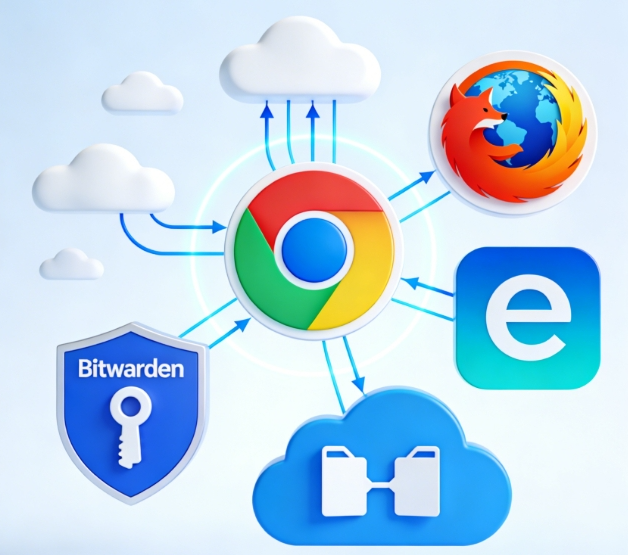
Let's Talk About Bitwarden First
Bitwarden is an open-source password manager that I've been using for over two years now.
What makes me most confident about it is its security—it uses AES-256 bit encryption, so even they can't see your passwords. Plus, it's open source, and anyone can review the code, which is important for privacy-conscious users.
In daily use, my favorite feature is auto-fill. Open a website, username and password are automatically filled, click login and you're done. No more flipping through password books, no more worrying about entering the wrong password and getting locked out. When I need to register a new account, it can automatically generate an ultra-long random password—secure and worry-free.
Cross-platform is also a plus. I use it on Windows, it works on Mac, and there's an app for phones too. Passwords are stored in the cloud and sync across all devices, which is really convenient.
Now Let's Chat About Bookmark UniSync
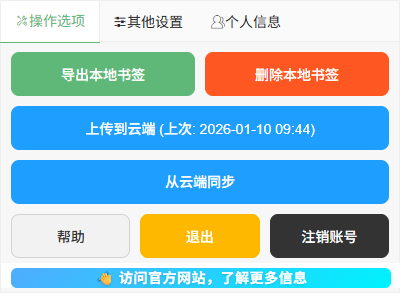
If Bitwarden solves the password problem, then Bookmark UniSync solves the bookmark problem.
What surprised me most about this tool is its simplicity. No need to set up your own server, no complicated configuration—just install the browser extension and you're ready to go. Bookmarks appear directly in the browser's bookmark bar, just like native bookmarks, with no extra interface to adapt to.
Cross-browser synchronization is its strength. Syncing between Chrome and Edge works perfectly, and it can even sync to Safari (though Safari requires installing an additional app). When I bookmark a website at work using Chrome, I can see it when I open Edge at home—this feeling is really great.
Real-time sync is also impressive. When I add, delete, or modify bookmarks on any device, they automatically update on all other devices. No need to manually click a sync button, no need to worry about data loss.
The Effect of Using Both Tools Together
Using either one alone can solve many problems, but using both together produces the best results.
Let me use my own example. I normally use Chrome at work and Edge on my personal laptop at home.
At work, when I see a good article, I bookmark it and Bookmark UniSync automatically syncs it. When I need to register an account, Bitwarden automatically generates a password and saves it. The whole process is smooth, and I hardly even notice these two tools exist.
When I get home and open the Edge browser, all the bookmarks are already there. Click a bookmark to open the website, Bitwarden automatically fills in the password, and I can log in directly and continue reading. It's as if I never switched devices.
This seamless experience really changed my attitude toward digital life. Before, I was always worried about losing data when switching devices; now, I actually find working across multiple devices to be easier.
If You Encounter Issues During Use
If you want to try this solution but encounter any problems during installation or use, feel free to contact me at any time.
- 📧 Email Support: support@ithuajiao.site
- 💬 WeChat Official Account: Search for "挨踢花椒" and send a private message
- 🌐 Online Help: Visit our help documentation
I hope this solution can help you solve the same frustrations. Digital life should be this simple.